



Process to purchase Microsoft 365
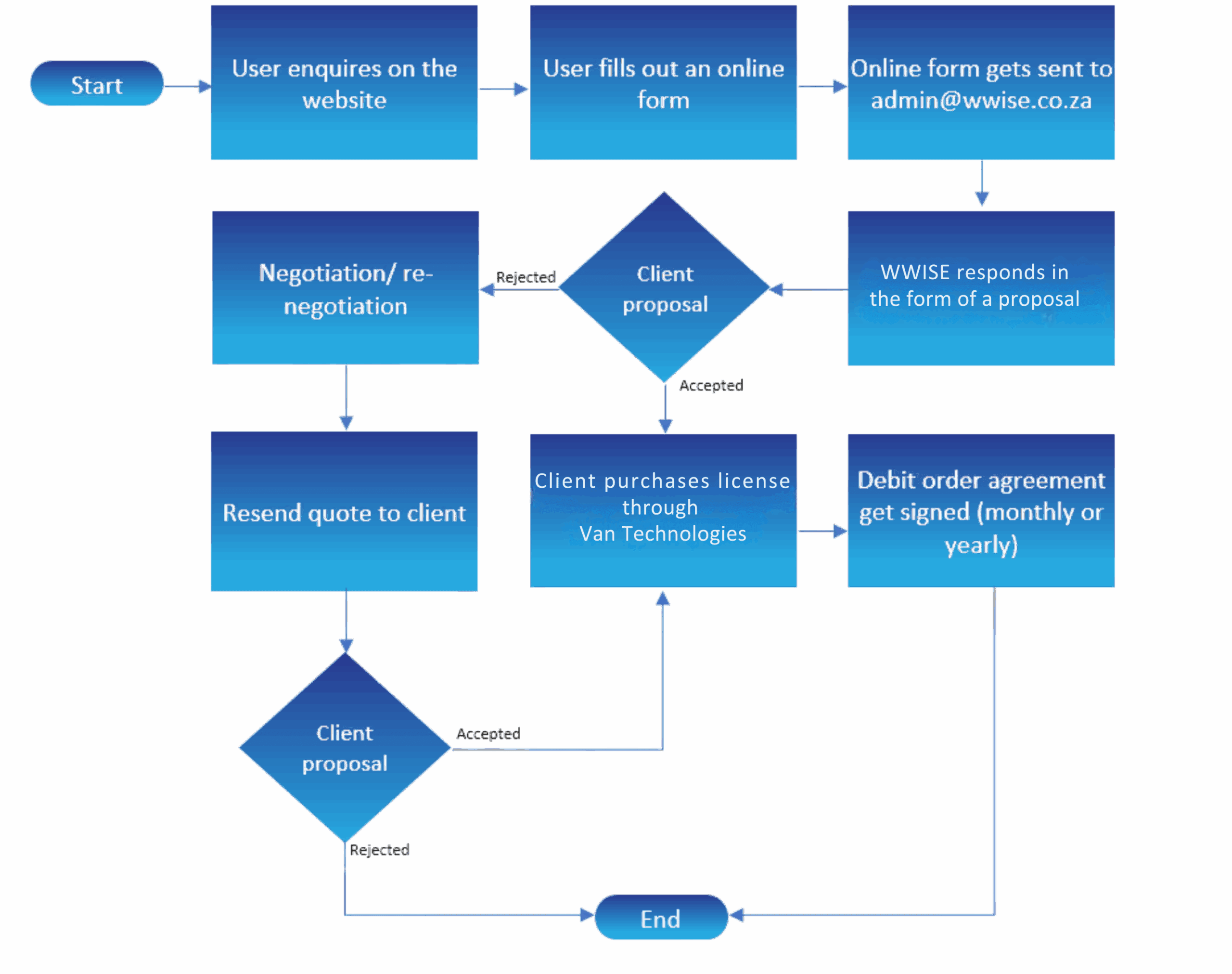
WWISE is partnered with VAN Technologies. VAN Technologies is a Microsoft Gold Partner and an authorised re-seller of Microsoft products and licensing.

Microsoft Excel
When MS Excel was first rolled out by Microsoft, it had to compete with an already established Lotus 1-2-3-, but its surpassed Lotus 1-2-3 ultimately.

Microsoft Word
Amongst the various apps, Microsoft Word, a word processing app, is the most popular and most extensively used application across the globe.

Microsoft PowerPoint
Microsoft PowerPoint has definitely made creating and showing presentations very easy.

Microsoft Publisher
Publisher is an Office app for desktop publishing. It is loaded with a large array of features to create layouts and high-grade text and pictures

Microsoft Access

Microsoft SharePoint

Microsoft Viva Engage

Microsoft Delve

Microsoft Forms

Microsoft Teams

Microsoft OneDrive

Microsoft Planner

Power Apps

PowerBI
Want to be able to connect and collaborate with people across your organisation to make faster and better business decisions?

Microsoft Excel
When MS Excel was first rolled out by Microsoft, it had to compete with an already established Lotus 1-2-3, but it surpassed Lotus 1-2-3 ultimately. Excel is an app that is mainly based on spreadsheets and is available on Android, iOS, macOS, and Windows. Excel is used for storing information such as numbers and related data and it is helpful in ensuring ledgers balance and for account maintenance. When creating risk registers and other useful documentation for clients’ management systems, WWISE uses Microsoft Excel to its full capabilities.

Microsoft Word
Amongst the various apps, Microsoft Word, a word processing app, is the most popular and most extensively used application across the globe. Users can easily launch this app on their Windows and Mac computers. Word was first released in the year 1983 for the MS-DOS operating system. With Microsoft Word, typing content has become easy. This content can be shared with others and edited in real-time. WWISE makes use of Microsoft Word to create and update policies, processes and procedures for clients’ management systems.

Microsoft PowerPoint
Microsoft PowerPoint has made the creation and demonstration of visually appealing presentations simple. With the help of Office’s iconic PowerPoint programme, users can easily make creative and engaging slideshows and insert not only text but also animations, pictures, videos, and other graphics. They can even convert these presentations into videos. Microsoft PowerPoint has changed the way organisations showcase policies, procedures, projects and changes within organisations and improved the way sales pitches are done.

Microsoft Publisher
Publisher is an Office app for desktop publishing. It is loaded with a large array of features to create layouts and high-grade text and pictures. This Microsoft app is available in the latest Office versions and their respective editions. It is a basic and easy to use programme. Even if you are not an expert at designing, you can easily generate professional-grade graphics and other publications using this app.

Microsoft Access
Microsoft Access is a database management system (DBMS) from Microsoft that combines the relational Microsoft Jet Database Engine with a graphical user interface and software development tools. It is a member of the Microsoft 365 suite of applications, included in the Professional and higher editions or it can be bought separately.
Microsoft Access stores data in its format based on the Access Jet Database Engine. It can also import or link directly to data stored in other applications and databases.

Microsoft Sharepoint
Effective content management is key to staying productive and building a lucrative business. Is your organisation still using a file server? Do your employees need to be connected to the server to access data, documents, and files? SharePoint is a cost-effective and versatile content management platform that is perfect for teams. With SharePoint, you can keep track of all your documents and templates that need to be organised, managed, and/or reviewed by various team members. Internet access is the only thing that your team needs to access your organisation’s shared data from anywhere in the world.

Microsoft Viva Engage
Want to be able to connect and collaborate with people across your organisation to make faster and better business decisions? With Viva Engage, you can. By joining and creating groups on Viva Engage, you can know what’s happening daily in your organisation. Plus, Viva Engage allows you to safely collaborate with customers, contractors, or other members of your organisation. It also allows you to add documents, photos, or videos to conversations you’re having, and with their iOS or Android mobile app, employees can stay connected no matter where they are.

Microsoft Delve
Office Delve is a cloud-based solution that displays personal content. It is powered by Office Graph (a database that collects information on user identity and activity). From OneDrive for Business to SharePoint to Exchange, it gives you information based on what you’re working on and whom you’re working with. Delve is a collaboration tool that helps users find colleagues to create, edit and share documents. It allows users to embed documents, videos, and images.

Microsoft Forms
Microsoft Forms gives Office 365 users the ability to create online capture forms, quizzes and surveys without any web development required. Each form can be set to be externally or internally available for use. If you set it to be used externally, the responses logged will be logged anonymously, unless you request them to input their names as part of the form. All responses are then logged and visible from the form itself under the responses tab whereby you can check on the results from the form. You can also open the results in a tabular view in Excel or PowerBI if you require it in an external source.

Microsoft Teams
Microsoft Teams is your hub for teamwork in Office 365, giving you the platform you need to manage all your files, conversations and tools in one convenient team workspace. With Teams, you can communicate more effectively with members of your organisation relating to various projects and initiatives.

Microsoft OneDrive
By automatically saving documents to the Cloud, OneDrive makes it easy for your users to manage and share documents from anywhere, on any device of their choice. When looking for versatile cloud-based storage options keep OneDrive Personal and OneDrive for Business in mind.

Microsoft Planner
Want to be able to take the chaos out of your organisation’s teamwork? With Microsoft Planner, you can organise task lists, create new plans, share files, and assign tasks, as well as keep up to date on what your teams are working on. Planner gives each plan its board, allowing you to organise your various tasks into buckets, and categorise your tasks based on their status, severity, and responsible person.

PowerBI
Microsoft Power BI Pro is a suite of business analytics tools that can help you analyse data and share business insights. Power BI Pro provides your organisation with a unique opportunity to delve deeper into your data so that you can make more informed business decisions. With the data that Power BI harnesses, you can hone in on new customers and track how effective your campaigns are, giving you the competitive edge over others in your industry.
Microsoft Power Apps
Whether you’re using a pre-built template, or you’re starting from scratch, PowerApps allows you to build the app(s) you need to solve business problems within your organisation. There’s no code-writing required, and you can publish and use those apps on both web and mobile.
License costs
Microsoft 365 Business Basic
- Hub for teamwork to connect your teams with Microsoft Teams
- Web versions of Office applications: Outlook, Word, Excel, PowerPoint,File storage and sharing with 1 TB of OneDrive storage
- Online meetings and video conferencing for up to 250 people
- 24/7 phone and web support
Microsoft 365 Apps for Business
- Desktop versions of Office applications: Outlook Word, Excel, PowerPoint
- File storage and sharing with 1 TB of OneDrive storage
- One license covers fully installed, always-up-to-date Office apps on 5 phones, 5 tablets, and 5 PCs or Macs per user
- Automatically updated with new features and capabilities
- 24/7 phone and web support
Microsoft 365 Business Standard
- Desktop version of Office application: Outlook, Word, Excel, PowerPoint
- File storage and sharing with 1TB of OneDrive storage
- One license covers fully installed, always-up-to-date Office apps on 5 phones, 5 tablets, and 5 PCs or Macs per user
- Automatically updated with new features and capabilities
- 24/7 phone and web support
Microsoft 365 Business Basic
- Desktop version of Office application: Outlook, Word, Excel, PowerPoint
- File storage and sharing with 1TB of OneDrive storage
- One license covers fully installed, always-up-to-date Office apps on 5 phones,5 tablets and 5PCs or Macs per user
- Automatically updated with new features and capabilities
- 24/7 phone and web support
Microsoft 365 Apps for Business
- Desktop versions of Office applications: Outlook, Word, Excel, PowerPoint
- File storage and sharing with 1 TB of OneDrive storage
- One license covers fully installed, always-up-to-date Office apps on 5 phones,5 tablets and 5 PCs or Macs per user
- Automatically updated with new features and capabilities
- 24/7 phone and web support
Microsoft 365 Business Standard
- Desktop version of Office application: Outlook, Word, Excel, PowerPoint
- File storage and sharing with 1TB of OneDrive storage
- One license covers fully installed, always-up-to-date Office apps on 5 phones,5 tablets and 5PCs or Macs per user
- Automatically updated with new features and capabilities
- 24/7 phone and web support
